A Company

  • Subscribe to our RSS feed.
  • Twitter
  • StumbleUpon
  • Reddit
  • Facebook
  • Digg
Showing posts with label photos. Show all posts

Monday, 18 September 2006

Picasa goes online, gets new features too

Posted on 20:38 by Unknown
Posted by Michael Herf, Picasa Engineer

I have 80,000 photos in Picasa, Google's free photo organizer, but most of my friends haven't had a chance to see them yet. That's why I'm so excited about the new version of Picasa that came out today. It has a feature called Picasa Web Albums that lets you post and share your photos online for free with just one click. You can show the world (or just your friends and family) what kinds of pictures you've been taking. And best of all, you can even download your friends' online photos right back to Picasa.

I run around at parties and take photos of people, and now my friends can see the pictures online as soon as I post them. Rather than bugging me all the time to email them around (which I'm too lazy to do), now they're asking to have the bad shots deleted instead. Some of them even add online comments right to the photos themselves.

We've also fixed a whole bunch of things in Picasa. Folders finally work as you'd expect, so people who've kept their photos meticulously organized in folders and subfolders can see them displayed the same way in Picasa. And we've added a shiny new feature to photo-editing: Save. Your Picasa edits can now be preserved when using other programs. The save feature is even undoable, so you never lose your original files.

And there's more -- you can import into any folder you like, make time-lapse sequences into movies, search by color, create a screensaver with beautiful visual effects, and even re-arrange Picasa's buttons. Oh, and we also made Picasa work with Google Earth, so you can put information about where you went on vacation into the photos themselves, and then, view your shots on a 3-D globe. Try it all out for yourself at picasa.google.com.
Read More
Posted in apps, photos | No comments

Tuesday, 15 August 2006

A better way to organize photos?

Posted on 09:37 by Unknown
Posted by Adrian Graham, Picasa Product Manager

It's not always easy to search through your personal photos, and it's certainly a lot harder than searching the web. Unless you take the time to label and organize all your pictures (and I'll freely admit that I don't), chances are it can be pretty hard to find that photo you just know is hidden somewhere deep inside your computer.

We've been working to make Picasa (Google's free photo-organizing software) even better when it comes to searching for your own photos—to make finding them be as easy as finding stuff on the web. Luckily we've found some people who share this goal, and are excited that the Neven Vision team is now part of Google.

Neven Vision comes to Google with deep technology and expertise around automatically extracting information from a photo. It could be as simple as detecting whether or not a photo contains a person, or, one day, as complex as recognizing people, places, and objects. This technology just may make it a lot easier for you to organize and find the photos you care about. We don't have any specific features to show off today, but we're looking forward to having more to share with you soon.
Read More
Posted in apps, photos | No comments

Wednesday, 2 August 2006

It's all about the photos...on a Mac

Posted on 11:57 by Unknown
Posted by Ted Bonkenburg, Software Engineer, Infrastructure

I'm happy to tell you about the release of Picasa Web Albums Uploaders (beta, of course) for Mac OS X. Picasa Web Albums makes it simple to share photos with friends and family, and now we've made it even easier on the Mac. This new download comes with two handy tools for uploading photos: There's a plug-in for uploading your pics within iPhoto. If you don't use iPhoto, or just want to upload the occasional picture, just drag your photos into the provided standalone app and click Upload. Either way, I can't wait for my fellow Mac users to showcase their talents.

Normally I work on search engine infrastructure. I love my work on web search, but as a change of pace I decided to use my 20 percent time to make Picasa Web Albums better for Mac users. Fortunately, I was not alone. The Picasa and Mac development teams embraced the project and provided great assistance. Greg Robbins, a co-conspirator in the famous graphing calculator story, worked to refine the user interface. Later, another one of our Mac engineers, Mike Morton (I’m OK, mentor), took over as project lead, made quick work of creating the iPhoto export plug-in, and became the one responsible for incorporating feedback and finishing up the application and plug-in.

For me this has been a great opportunity to meet and work with new people, explore new technologies, and help create something that I hope the Mac community will find useful. So, please sign up for Picasa Web Albums, download the uploaders, and show the world some beautiful photos.
Read More
Posted in apps, photos | No comments

Tuesday, 13 June 2006

It’s all about the photos

Posted on 21:11 by Unknown
Posted by Adrian Graham, Product Manager

Reading feedback from Picasa users is one of the best parts of my job. And lately the feedback has been especially clear and direct: please offer an easy way to share photos online. Today, we’re delighted to begin testing a new Picasa feature that does just that. It’s called Picasa Web Albums.

In case you’re not familiar with Picasa, it’s Google’s free desktop photo management software. Picasa is a quick download that makes it easy for people to organize and edit their pictures using something that’s simple and clutter-free. It’s all about the photos. And now we’ve tried to bring that same experience to online photo sharing with Picasa Web Albums. Just pick a bunch of your photos from Picasa and upload them into a web album in a couple of clicks. Once they’re online, it’s super-easy to share them – click the “Share” button from anywhere on the site or, just email friends the URL for your public gallery.

Take a look at the photos that our tester wants to share: Try flipping through photos using the arrow keys (we pre-fetch photos so they load quickly). Zoom in and out to check out details or see the whole photo. Or maximize them on a large monitor. We focused on the photos, not ads or archiving, because we know how important your photos are to you especially when you want to share them. Of course, there's a lot we want to add and improve — which is why for the moment, we're only testing this feature by invitation. If you’re interested in making your own Picasa Web Albums (and helping us make it better), give us your Gmail address here. We’ll be sending out invitations first come, first served.

Once you have an invitation, you’ll be able to download the latest version of Picasa with the web uploading feature. And actually, it’s not just about web uploading -- there’s also downloading. We wanted to make sure you can keep enjoying the photos your friends have shared with you. With this in mind, when viewing others’ galleries, you can download an entire album of photos directly into Picasa with just a couple of clicks. For uploading and downloading to and from Picasa Web Albums, you’ll need the new version of Picasa – again, it’s only available to invited users for the time being.

Finally, you may be wondering if this costs anything. No, and no hidden fees either. Picasa is free as always, and Picasa Web Albums comes with 250MB of free storage space. That’s enough for approximately 1,000 wallpaper-sized photos at 1600 pixels each. We also offer an easy-to-understand storage upgrade option if you have a whole lot more pictures to share.

We’re working hard to make both Picasa and Picasa Web Albums better. And we’re excited to start making our most commonly-requested feature available to more people. Try it out and tell us what you think. We’d love to hear from you.
Read More
Posted in apps, photos | No comments

Wednesday, 24 May 2006

Picture this: Picasa for Linux

Posted on 14:15 by Unknown
Posted by Chris DiBona, Open Source Programs Manager

Let's say you happily use Linux, but you sometimes find yourself wishing you had access to interesting new apps that launch for Windows but not Linux. And maybe, like a lot of us, you have a lot of photos stored on your personal machine, and you've read about or even tried Google's photo organizer, Picasa. But using it means switching to Windows, even temporarily. (We know--thanks but no thanks.)

Well, we've got you covered, because today we're launching Picasa for Linux on Google Labs. It incorporates nearly all the features of the current Windows version of Picasa, providing you with the tools you need to easily find, edit, and share the photos on your computer. And because it runs on a carefully tested version of Wine, Picasa avoids the slowing effects of an OS emulation or a virtual machine.

Have fun with it--and tell us what you think.
Read More
Posted in apps, photos | No comments

Monday, 30 January 2006

Picasa x 25

Posted on 06:00 by Unknown
Posted by Sanne Su San Lim, Picasa Localization Lead

You love taking photos. You love your photo collection on your computer. But your options have been limited if there's no easy-to-use photo software available in your language. So if you lived close to Wieliczka, Pulau Seribu or Wat Phra Kaeo, you were stuck with English-only.

But no more! The team behind Picasa has now added 25 new interface languages: Bulgarian, Croatian, Czech, Danish, Estonian, Finnish, Greek, Hungarian, Icelandic, Indonesian, Latvian, Lithuanian, Norwegian, Tagalog, Polish, Romanian, Serbian, Slovak, Slovenian, Catalan, Swedish, Thai, Turkish, Ukrainian, and Vietnamese.

All of these languages are one click away. Just download Picasa, and it will automatically match your system's native language. If you wish to change your Picasa language, go to Tools > Options and use the pull-down menu on the "General" tab. (You'll need to close and re-open Picasa to see your new language selection take effect.)

Shouldn't you be able to organize your photos no matter where you are and what language you speak? Of course.
Read More
Posted in apps, photos | No comments

Friday, 28 October 2005

Saying thank you with pictures

Posted on 12:11 by Unknown
Posted by Beth Campbell, Product Marketing Manager

I recently got married and wanted to send out thank-you notes together with hundreds of photos our guests took using the cameras we put on the tables. Picasa made the process super easy.

In Picasa, select the folder with your pictures. Click the "Gift CD" button and follow the instructions to set your picture size and CD name. To add a nice effect, check the "Include Slideshow" box -- this adds a slideshow presentation that plays when the CD is launched (way more fun than a boring list of files). For recipients who might enjoy saving the photos and viewing them later, check the box to include a copy of Picasa on the CD (it's only 3.9MB). Click "Burn Disc" and Picasa creates the CD.

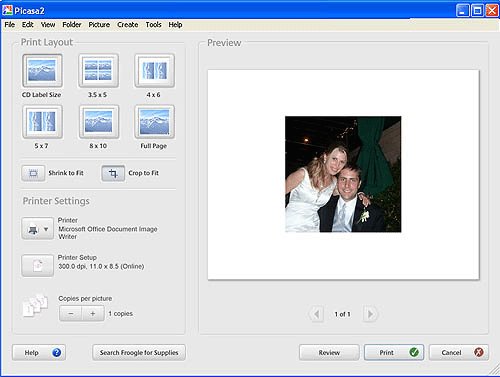
The finishing touch: a customized photo CD cover. Select a picture and click the "Print" button. Here's what it looks like:

In the top menu, go to to Tools > Options > Printing, select CD Label Size and click OK. Set CD Label as your layout size and print.

You're done -- and now I'm done with my thank-you "work." I'm happy to report the photo CDs were a big hit.
Read More
Posted in apps, photos | No comments

Tuesday, 20 September 2005

Polyglot pictures

Posted on 08:24 by Unknown
Posted by Adrian Graham, Picasa Product Manager

People all around the world are photo-mad, snapping digital photos everywhere they go. Today people in Australia, Austria, Belgium, Brazil, Canada, China, France, Germany, Hong Kong, India, Italy, Japan, Netherlands, Russia, South Korea, Spain, Switzerland, Taiwan and the UK have a new tool: Google's Picasa photo organizer in their own (local) language.
Read More
Posted in apps, photos | No comments

Friday, 29 July 2005

Photo sharing, unplugged

Posted on 06:00 by Unknown
Posted by Beth Campbell, Picasa team

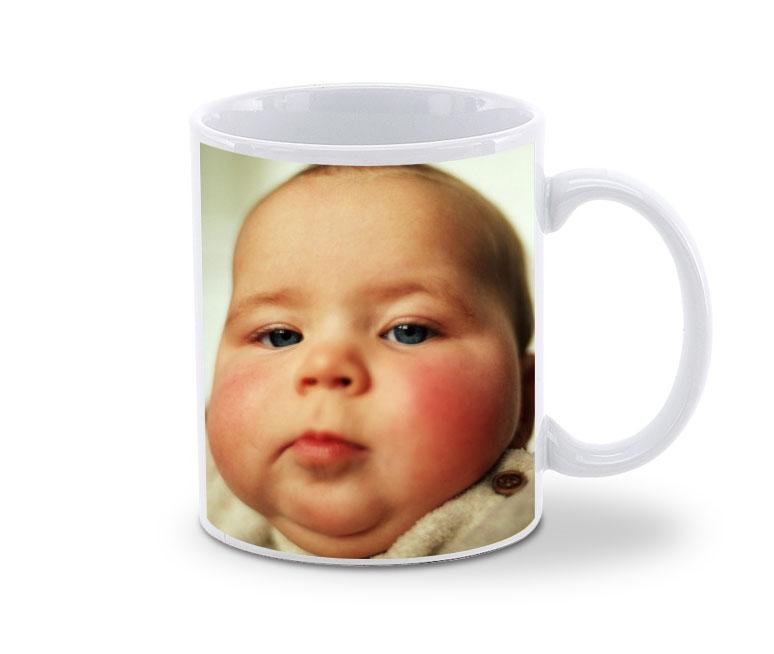
Picasa is great for managing photos, but I also use it for ordering prints and photo gifts. A lot of my friends and family prefer to get photos the non-digital way, and Picasa lets me quickly edit photos and albums and then send them to some of the most popular online photo finishers. I just select the pictures I want (hold down the CTRL key to select more than one). Then I click the "Order" button at the bottom of the screen.

I choose the photo finisher I want to use, sign in to that site, and the selected photos are quickly uploaded. From there, shop as usual. Here's a gift a mother could love:
Whether you pick prints or mugs or photo books, it's all about helping you share photos faster and more easily.
Read More
Posted in apps, photos | No comments

Monday, 17 January 2005

Smile and say "cheese"

Posted on 20:16 by Unknown
Ever since we launched the first version of Picasa back in October, 2002, all of us on the Picasa team have been making lists of features we'd like to add. Now, six months after we joined Google, Picasa 2 is ready, and we're dying to show you all the cool new stuff you can do with your digital pictures. At the top of the list are the things our users have been asking for: more editing features and organizing options, CD burning, picture captioning, and integration with online photo services. But there are little touches, too. Check out this photo collage:


Of course, Picasa 2 works great with other Google services; you can post pictures to your own blog with the Blogger button, order print supplies through Froogle, and send pictures using Gmail. And somehow our engineering team made Picasa 2 run just as fast, even on slower machines.

It's been an amazing experience to become part of Google and have all of their resources behind us. But at the core, it's the same group of Picasa engineers and designers who've been hard at work for more than a year to bring you this major new release. I'm incredibly proud of their accomplishment and I hope you'll share my excitement when you give Picasa 2 a try.

Download it here -- it's still totally free and it'll only take a minute because it's still only 3 megabytes (how do they do that?).

Keep clicking!

Lars Perkins
General Manager, Picasa
Read More
Posted in apps, photos | No comments
Older Posts Home
Subscribe to: Posts (Atom)

Popular Posts

  • About that fake post
    Posted by Karen Wickre, Google Blog team A bug in Blogger enabled an unauthorized user to make a fake post on the Google Blog last night, cl...
  • On the alert for bloggers
    Posted by Naga Sridhar Kataru, Software Engineer So many interesting blogs and so little time! If you're anything like me, you like to p...
  • OneBox for all your corporate information
    Posted by Dave Girouard, VP, Enterprise We added OneBox functionality to our Google Search Appliance today, which means you can now find j...
  • Racking up an honor
    We're five years old and already they're sticking us in a museum. The Computer History Museum, to be precise, a neighbor of ours her...
  • We' re turning 1....
    Posted by the Gmail team ...and to celebrate our birthday, we're giving all Gmail users another gigabyte of space, and then some. And ye...
  • TechnoServe comes to Google
    Posted by Posted by Bruce McNamer, President and CEO, TechnoServe.org The Google Foundation supports select organizations whose work addres...
  • Day off for Dennis
    Posted by Rupert van Millingen, Google UK From time to time, we like to reflect the world we live in through the logo designs on our home pa...
  • About Google.org
    Posted by Sheryl Sandberg, VP, Global Online Sales & Operations When we told prospective shareholders about Google and how we wanted to ...
  • Easier web page creation
    Posted by Justin Rosenstein, Product Manager, Google Page Creator My mother wanted a site for her law practice that potential clients would ...
  • Stardate 0817.06
    Posted by Tom Galloway, Technical Writer Starbase 24 Commander's personal log. I find myself looking forward to my upcoming trip to Eart...

Categories

  • accessibility
  • ads
  • Africa
  • apps
  • April 1
  • Asia
  • books + book search
  • crisis response
  • developers
  • doodles
  • education and research
  • enterprise
  • Europe
  • free expression
  • google.org
  • googlers and culture
  • green
  • health
  • Latin America
  • mobile
  • online safety
  • personalization
  • photos
  • policy and issues
  • privacy
  • recipe
  • recruiting and hiring
  • scholarships
  • search
  • search trends
  • small business
  • user experience and usability
  • youtube and video

Blog Archive

  • ▼  2006 (231)
    • ▼  October (27)
      • On the alert for bloggers
      • Scary stories
      • Do you "Google?"
      • Google Earth voter guide
      • Eureka! Your own search engine has landed!
      • The rebirth of cool
      • Heading to the X Prize Cup
      • Eric and the NAE
      • Looking for Google Talk stories
      • Corporate solar is coming
      • Maps in the Palm in your hand
      • Music for your eyes
      • Teacher's helper
      • Better together: Docs & Spreadsheets
      • Score one for the Sun Devils
      • Greetings, Earthlings!
      • Inside Macs at Google
      • About that fake post
      • Our security stance
      • More developer love with Google Code Search
      • Got blog? Will ping.
      • The new Groups experience
      • Accessible Search now has advanced search features
      • The Literacy Project
      • Yes, you can have a pony
      • Create web apps on top of Google search
      • Discount with Checkout
    • ►  September (26)
    • ►  August (32)
    • ►  July (18)
    • ►  June (25)
    • ►  May (19)
    • ►  April (20)
    • ►  March (20)
    • ►  February (26)
    • ►  January (18)
  • ►  2005 (199)
    • ►  December (18)
    • ►  November (20)
    • ►  October (20)
    • ►  September (27)
    • ►  August (20)
    • ►  July (14)
    • ►  June (11)
    • ►  May (18)
    • ►  April (16)
    • ►  March (21)
    • ►  February (7)
    • ►  January (7)
  • ►  2004 (58)
    • ►  December (11)
    • ►  November (6)
    • ►  October (15)
    • ►  September (7)
    • ►  August (2)
    • ►  July (4)
    • ►  June (5)
    • ►  May (7)
    • ►  April (1)
Powered by Blogger.

About Me

Unknown
View my complete profile